

If your company shares leads, opportunities or cases with a distributor, a reseller or a sister company that also runs Salesforce, there is a good chance the link between the two orgs is Salesforce to Salesforce (S2S). The Salesforce to Salesforce retirement now has a firm horizon: in the Spring '27 release, S2S stops working in every org. There is no automatic migration, and every replacement involves a design choice and, often, a new licence. This guide explains what changes, who is affected, the four replacement paths and a practical plan for the coming weeks.
What the Salesforce to Salesforce retirement changes
S2S is one of the oldest features of the platform. It lets two orgs publish and subscribe to records, so a lead or an opportunity created in one org appears in the other. In the developer documentation, the PartnerNetworkRecordConnection object represents exactly that: a record shared between Salesforce organizations through S2S.
The official Salesforce knowledge article on the S2S retirement, published in October 2026, sets out a phased timeline:
- Spring '26: admins can no longer turn on S2S in an org. Orgs that already had it keep it.
- After Summer '26: official support has ended. No bug fixes or enhancements, although you can still log a case.
- Spring '27: S2S is fully retired in all orgs and no longer functions.
The Salesforce list of active product and feature retirements places the S2S retirement in Spring '27, February 2027. Major releases reach instances in waves, so check your own instance on the maintenance calendar of Salesforce Trust: your real deadline may be a few weeks earlier or later than a colleague's.
Salesforce's reasoning is that channel sales and multi-org setups need more than copying records between databases. The Summer '26 architect highlights on the Salesforce blog describe S2S as a low-friction shortcut for problems that really call for a more structured pattern, and warn that the change will take real planning.
Who is affected
If S2S is enabled in your org, assume you are affected until you have proven otherwise. In practice:
- Channel and partner managers: teams that pass leads to resellers, or receive opportunity updates back from them, through S2S connections.
- Groups with several orgs: subsidiaries or business units that each run their own org and exchange accounts, contacts or cases.
- Admins: own the list of connections, published and subscribed objects, field mappings and the automation that runs on received records.
- Developers and integration owners: any Apex, flow, report or SOQL query that reads PartnerNetworkRecordConnection or related S2S data will need to be rewritten or removed.
- Sales and service managers: reports and dashboards built on shared records will show stale data once the link stops.

One point is easy to miss: the partner's org is affected at the same moment. A connection has two ends, and the replacement must be agreed with the other company's admin, not designed alone. Records already copied into the other org stay there as ordinary records; the retirement stops the flow of updates, it does not clean anything up.
The four replacement paths
The knowledge article and the architect highlights point to four options. Each fits a different need, and none is a drop-in copy of S2S.
- Partner Cloud: for companies that share information with partners who resell their offers. Partners work in a branded portal instead of their own org. According to the Partner Cloud pricing page, the PRM edition is listed at €25 per member per month and the Partner Ecosystem Management edition at €50, billed annually, as a separate purchase from Sales Cloud.
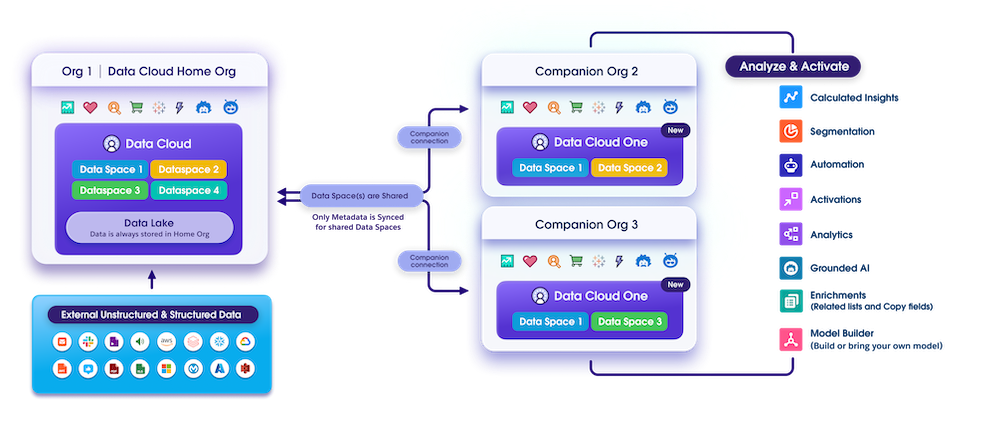
- Data Cloud One: for companies with several orgs that need a unified view of customers. The Trailhead unit Connect Multiple Orgs with Data Cloud One explains the model: a home org where Data 360 is provisioned, companion orgs linked to it with a no-code companion connection, and only the metadata of the data spaces you choose being shared. Not every Data 360 feature is available in companion orgs.
- MuleSoft Anypoint Platform: for complex or bidirectional integrations that need transformation, routing, error handling or orchestration across several systems.
- MuleSoft for Flow: for declarative-first teams with process-level needs. The MuleSoft announcement of MuleSoft for Flow: Integration describes a low-code tool, used from within Salesforce, with more than 40 prebuilt connectors and visual field mapping.
To choose, answer three questions. Is the other party an external partner or another org of your own group? Do you need record-level sync, or a shared view of the customer? Who will own the integration in two years: an admin, or an integration team? An external reseller usually points to Partner Cloud; a group with several orgs and a customer-360 goal points to Data Cloud One; record-level sync with business rules points to MuleSoft. Salesforce states that each alternative has licence or cost impacts, so involve your account executive early and budget for it before the end of the year.
What to do now: a six-step Salesforce to Salesforce migration plan
- Confirm the scope. In Setup, open the Salesforce to Salesforce connections and list every active connection: partner org, status, business owner and last activity. Export the connection history before you change anything.
- Map what is shared. For each connection, note the published and subscribed objects, field mappings, filters and auto-accept settings, plus the record volume and how often updates flow.
- Find the dependencies. Search Apex, flows, validation rules, reports and managed packages for references to PartnerNetworkRecordConnection and S2S fields. Our guide to Salesforce release updates before Spring '27 uses the same review discipline.
- Pick a path per connection. One org can need two answers: Partner Cloud for resellers, MuleSoft for a sister company. Agree the target with the partner's admin and with whoever approves the licence.
- Build and test in a sandbox without S2S configured. This is Salesforce's own recommendation. Use stable external IDs so that records can be matched between orgs, and duplicate rules to catch copies, as in our guide to Salesforce duplicate rules.
- Cut over, then switch S2S off. Running both in parallel can create duplicates in one or both orgs, so keep the overlap short, reconcile record counts, and stop sharing once the new path is validated.

Before and after, in short:
- Before: two orgs copying records over a connection nobody fully documented, with automation on received records and reports that assume the link works.
- After: a named integration with an owner, a clear source of truth for each field, error handling you can monitor, and no dependency on a retired feature.
If the replacement is a new API integration, authenticate it properly from day one: our article on Salesforce integration authentication deadlines covers the current rules for integration users.
How to fit this into your Spring '27 calendar
The deadline is close. Between now and February 2027 you also have the holiday period, the Spring '27 sandbox preview and, for many teams, other retirements such as the Salesforce for Outlook retirement. A licence decision and a partner's agreement can each take several weeks. A realistic target is to finish the inventory in November, decide the path and the budget in December, and build and test in January.
A quick checklist for your next steering meeting:
- Is S2S enabled in our org, and how many connections are active?
- Which business processes stop if the connection stops tomorrow?
- Has the partner's admin been told, and who is our contact there?
- Which replacement path, and who signs off the cost?
- Which reports and automations must be rebuilt?
Conclusion
The Salesforce to Salesforce retirement is a hard stop: in Spring '27, records stop flowing between connected orgs. The fix is not a setting but a small integration project, with a partner on the other side and, in most cases, a new licence. Start with the inventory this month, choose one path per connection, and test without S2S in a sandbox. If you want help mapping your connections and building the replacement, our CRM migration team, our Salesforce Data Cloud consultants and our Sales Cloud specialists can run it with you and your partners.