
If your Salesforce org still runs platform events created before 2019, you have a hard deadline coming. The standard-volume platform events retirement takes effect on December 15, 2026. From that day, Salesforce states that users can no longer publish or subscribe to standard-volume events, so any flow, Apex trigger or external integration that still relies on them will simply stop receiving messages. This guide explains what is changing, how to tell whether you are affected, and how to migrate in a calm, controlled way before the date.
What the standard-volume platform events retirement changes
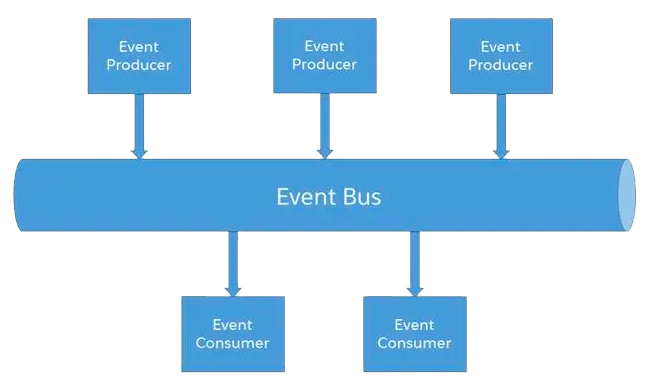
Platform events are Salesforce's publish-and-subscribe messaging layer: one system publishes an event (an order is shipped, a lead is reassigned) and one or more subscribers react to it. There have been two models. The legacy standard-volume model was deprecated in Spring '19, and since then every new event definition is high-volume by default.
According to the official Salesforce Help retirement notice, last updated in October 2026:
- Until December 15, 2026: existing standard-volume events still publish and deliver, but they are unsupported. Salesforce rejects support cases about them and ships no bug fixes.
- From December 15, 2026: publishing and subscribing to standard-volume events no longer works.
Some older developer documentation pages still mention later releases for this retirement. Treat the Help article as the reference and plan for December 15.
The good news is that the replacement already exists in your org. The Salesforce Platform Events Developer Guide explains that high-volume events are designed to scale to millions of events, keep messages for 72 hours instead of 24 hours for the legacy model, and are published asynchronously with internal retries.
Who is affected
You are affected only if your org contains custom platform events created as standard-volume, which in practice means events defined before Spring '19. Typical profiles:
- Orgs live on Salesforce for more than seven years: early event-driven integrations with an ERP, a logistics provider or a billing tool are the usual suspects.
- Teams with inherited integrations: a former partner or developer built an event-based sync and nobody has touched it since.
- Orgs using event-triggered automation: record-triggered Apex, platform event-triggered flows or legacy processes subscribed to an old event.
- External subscribers: middleware or custom apps listening through the Streaming API to a legacy event channel.
If all your platform events were created after 2019, you have nothing to migrate, but it is still worth a ten-minute check to confirm it.

Your three migration options
Salesforce documents three ways to move from standard-volume to high-volume events. Pick the one that matches the size and risk of your setup.
- Self-service migration in Setup (recommended by Salesforce). On the Platform Events page in Setup, a migrate button converts all your standard-volume events at once. It is available from Winter '27. Salesforce indicates the job usually takes about 15 minutes but can take up to 24 hours, and you receive an email for each migrated event.
- Scripted migration with the Metadata API. The PlatformEventMigration metadata type lets developers migrate events one by one from a pipeline. The matching Tooling API object exposes a migration status so you can track progress. Note that a migration cannot be undone once it starts.
- Manual rebuild. Create a new high-volume event, stop publishing the old one, let remaining messages be processed or expire, deactivate old subscriptions, then point every flow, trigger and Streaming API client at the new event.
Whichever path you choose, plan a maintenance window: during the self-service migration, publishing is unavailable and you cannot create new triggers or flows on the events being migrated.
What to do now: a step-by-step plan before December 15
Five weeks is enough time if you start this week. Here is the sequence we recommend to admins and integration owners.
- Inventory your events. In Setup, open Platform Events and list every custom event, its creation date and its subscribers. Export the list into your project tracker.
- Map publishers and subscribers. For each event, note who publishes (Apex, flow, external system) and who listens (triggers, flows, middleware, custom apps). This is the step most often skipped, and the one that prevents surprises.
- Run the migration in a full or partial sandbox first. Use the self-service button or a Metadata API script, then replay a realistic business scenario end to end.
- Test external subscribers explicitly. Ask each integration owner to confirm their client reconnects and receives messages after migration. Check replay behaviour, since retention differs between the two models.
- Schedule production in a quiet window. Freeze changes to related flows and triggers, warn business users that event-driven syncs may pause, and keep an eye on the confirmation emails.
- Monitor for a week. Watch error logs, integration dashboards and any flows that use fault paths for error handling. Close the change only when every subscriber is confirmed healthy.
A quick readiness checklist before you click migrate:
- Every standard-volume event and its owner is identified.
- Sandbox migration completed and business scenario tested.
- External integration owners have signed off.
- A production window and rollback communication plan are agreed.
Fit this deadline into your wider release plan
This retirement lands just before the Spring '27 release cycle, which already carries other integration changes. If you are reviewing connected apps and authentication, our guide to Salesforce integration authentication deadlines covers the related 2027 dates, and our checklist of release updates to fix before Spring '27 helps you batch the testing effort. Grouping these changes into one integration review is usually cheaper than handling them one by one.
Conclusion
The standard-volume platform events retirement is a narrow change with a sharp edge: for orgs that are affected, event-driven integrations stop on December 15, 2026, with no support to fall back on. The fix is well documented and often takes less than a day of hands-on work, provided you know which events exist and who depends on them.
If you need help auditing your event-driven integrations or planning the migration, ASC Digital can run the inventory and sandbox tests with your team as part of our Salesforce Sales Cloud services or Salesforce Service Cloud services.